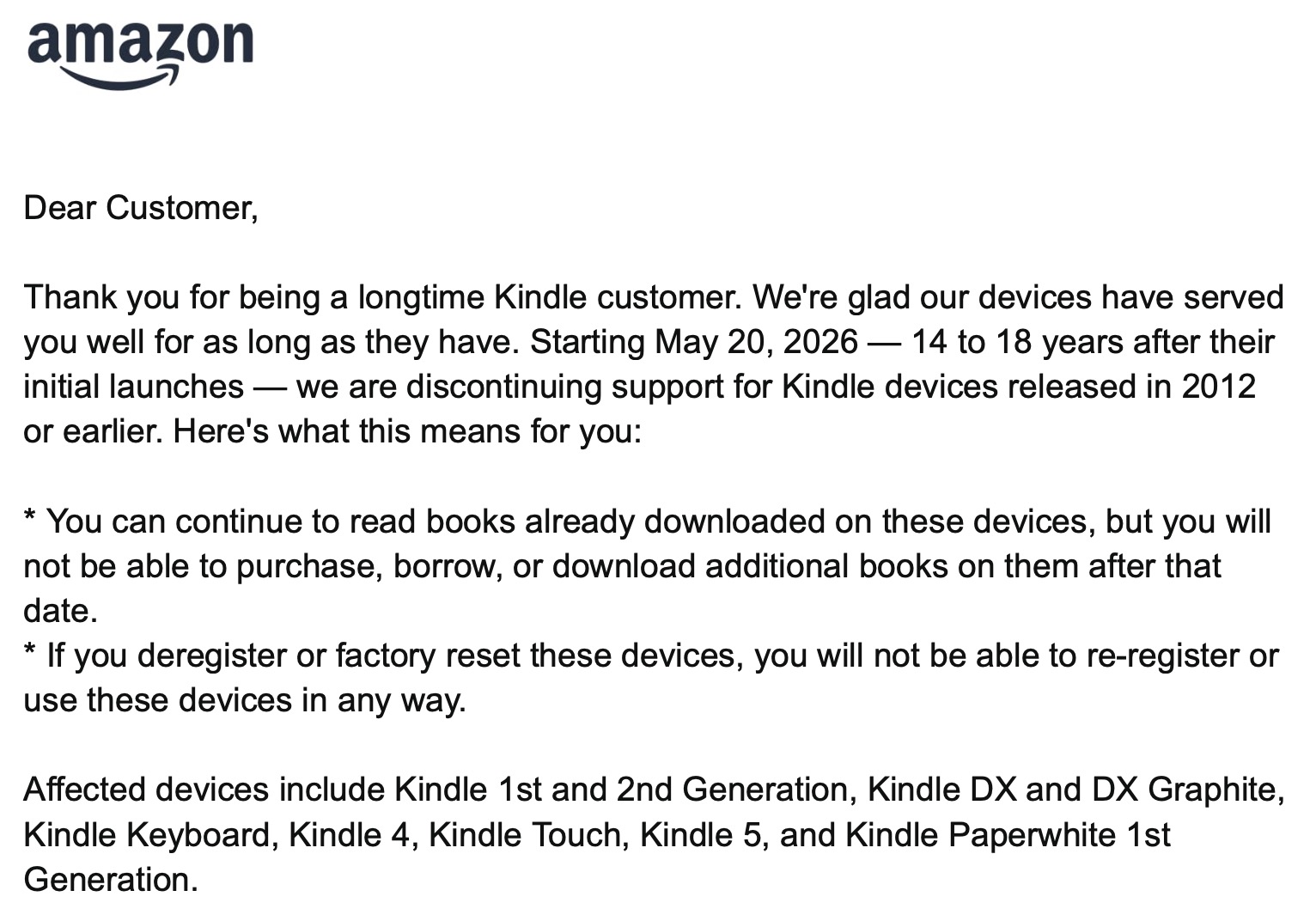
The other day, I received an email from Amazon that the Kindle I bought used from RE-PC a few years ago would no longer be able to download books from Amazon starting May 20, 2026. They graciously offered me a discount code to buy a brand new one, however.
I understand that tech gets old and at some point it no longer makes sense to support older devices. Newer models of phones have different hardware, and app programmers can only test their code on so many different devices before it becomes a huge headache for diminishing returns. So at some point, you just stop testing on older versions. This is currently happening to my iPhone X from 2017. It’s annoying because my phone is otherwise still plenty fast and capable, but I sort of get it. Apps are complicated, and my phone is missing 8 years of new hardware and is running a version of iOS from 2022.
But books have not gotten any more complicated or difficult to run since my 1st generation paperwhite Kindle was made in 2012. They are books! An e-book is just a somewhat fancy text file. The screen only needs to refresh itself at a rate of once per however-long-it-takes-me-to-read-a-page. The one I have still goes weeks without needing to charge. Text is crisp and easy on the eyes, and the thing is light and comfortable to hold. There is absolutely no reason why I would want to buy a replacement for it. It does 100% of the things I need an e-book reader to do. Like, I actively do not want it to do more than this because my Kindle is an escape from everything else in the world, and I love it for that.
Be sure all the books in your Amazon account are downloaded on your Kindle before May 20, 2026! They will still be readable using the regular kindle reader after support ends so long as they are downloaded to the device.
In part because I’m cheap and in part on principle, I decided to look for ways to keep this old Kindle working without Amazon’s help. I have already cut Amazon out of my life in pretty much every other way that is within my control. I do not pay for Prime, I actively tell people to smash their Ring spy cam doorbells, and I never buy stuff from Amazon unless I absolutely cannot find it anywhere else, which is rare. The next obvious step is to figure out how to use this old Kindle without going through it’s delinquent parent Amazon.
The good news is that there are a lot of smart people out there who have already figured all this out. If you only want to a way to get books on your device without Amazon, you may not even need to jailbreak it. You can use an open-source program called Calibre on your computer to transfer e-book files to your Kindle over the charging cable that will appear in your device library like normal. (Note that Calibre cannot handle e-book files with DRM protection, keep reading for more about this).
After a little web searching, though, I decided to jailbreak my Kindle so that I could unlock more customization options and install a different e-book reader called KOreader. I followed this guide and was able to make it work with relatively little confusion.
With KOreader, I still use Calibre to manage my e-books and upload them either via the Kindle’s charging cable or wirelessly over my home network. I was also able to get rid of the lock screen ads so now when the device is sleeping it shows the cover of the book I’m reading instead of an Amazon sales pitch (this took a little tinkering). If Amazon won’t support the device, then I won’t support their ads. Fair is fair!
KOreader can read epub files, a standard file format for e-books, and Calibre can convert most e-book files to epub if needed. KOreader also has a bunch of extra handy features like a progress bar at the bottom of the page that tells me how many pages until the end of the current chapter. I LOVE this little feature because when reading a print book I always put my bookmark at the start of the next chapter so I know how far it is to a good stopping point. KOreader also gives you a ton of options for customizing the font and spacing and margins that are missing in the default Kindle reader.
There is a catch, though. KOreader cannot read epub files that have DRM protection, including many epub files from libraries and e-book stores. There are ways around this (such as a third party DeDRM plugin for Calibre), but the line between that and piracy gets a little fuzzy. If you already paid for the books and just want to be able to read them with KOreader, then I don’t see any problem at all with removing the DRM. But you can see how this tool could be used for less legitimate purposes. ebooks.com lets users filter their search to show only DRM-free books, which is useful. Calibre also has a cool DRM-free book search feature built in. However, many books are not available this way.
I wonder if all the Kindle owners like me who go out seeking ways to keep their perfectly fine e-book readers working will cause something of a crisis for the e-book publishing market. Until now, Amazon has had such a strong hold on the industry that publishers have been able to distribute their books with laregely successful DRM restrictions. Sure, there are always some people seeking out ways around DRM, but most people were happy just using their Kindle to read books without ever giving any thought to the software restrictions attached to them. Now there will be a mainstream interest in circumventing e-book DRM for perhaps the first time. The secondary market will probably be flooded with cheap e-book readers that are perfectly capable with a little software tinkering. It’s $180 for a new Kindle Paperwhite without ads. Even a month before Amazon drops support, my model of Paperwhite is selling for $25-30 on ebay. Wait a month and the price may go way down, assuming Amazon actually follows through. If I were a publisher, I’d be pressuring them hard to continue support to prevent a rush of web searches for e-book DRM-removal tools.
It would be very cool if Libby, libraries or some other third party somehow works out a legit way for folks to read library books on Kindles without going through Amazon. Calibre is an amazing tool, and there must be an open way to support e-book borrowing. Now that there are going to be a huge number of free agent e-book readers floating around, this could be the time.